We all know that there have been disparities between different languages such as VB, VC++ and developers, who code program through these languages.
Monday, 9 January 2012
Code Management
We all know that there have been disparities between different languages such as VB, VC++ and developers, who code program through these languages.

Structure of a .NET Application
DLL Hell
DLLs gave developers the ability to create function libraries and programs that could be shared with more than one application. Windows itself was based on DLLs. While the advantages of shared code modules expanded developer opportunities, it also introduced the problem of updates, revisions, and usage. If one program relied on a specific version of a DLL, and another program upgraded that same DLL, the first
program quite often stopped working.
Microsoft added to the problem with upgrades of some system DLLs, like comctl.dll, the library used to get file, font, color and printing dialog boxes. If things weren't bad enough with version clashes, if you wanted to uninstall an application, you could easily delete a DLL that was still being used by another program.
Recognizing the problem, Microsoft incorporated the ability to track usage of DLLs with the Registry starting formally with Windows 95, and allowed only one version of a DLL to run in memory at a time. Adding yet another complication, when a new application was installed that used an existing DLL, it would increment a usage counter. On uninstall, the counter would be decremented and if no application was
using the DLL, it could be deleted.
That was, in theory. Over the history of Windows, the method of tracking of DLL usage was changed by Microsoft several times, as well as the problem of rogue installations that didn't play by the rules--the result was called "DLL HELL", and the user was the victim.
Solving DLL hell is one thing that the .NET Framework and the CLR targeted. Under the .NET Framework, you can now have multiple versions of a DLL running concurrently. This allows developers to ship a version that works with their program and not worry about stepping on another program. The way .NET does this is to discontinue using the registry to tie DLLs to applications and by introducing the
concept of an assembly.
On the .NET Platform, if you want to install an application in the clients place all you have to do is use XCopy which copies all the necessary program files to a directory on the client’s computer. And while uninstalling all you have to do is just delete the directory containing the application and your application is uninstalled.
Metadata
An Assembly is a logical DLL and consists of one or more scripts, DLLs, or executables, and a manifest (a collection of metadata in XML format describing how assembly elements relate). Metadata stored within the Assembly, is Microsoft's solution to the registry problem. On the .NET Platform programs are compiled into .NET PE (Portable Executable) files. The header section of every .NET PE file contains a special new section for Metadata (This means Metadata for every PE files is contained within the PE file itself thus abolishing the need for any separate registry entries). Metadata is nothing but a description of every namespace, class, method, property etc. contained within the PE file. Through Metadata you can discover all the classes and their members contained within the PE file.
Metadata describes every type and member defined in your code in a Multilanguage
form. Metadata stores the following information:
• Description of the assembly
o Identity (name, version, culture, public key).
o The types that are exported.
o Other assemblies that this assembly depends on.
o Security permissions needed to run
• Description of types
o Name, visibility, base class, and interfaces implemented.
o Members (methods, fields, properties, events, nested types)
• Attributes
o Additional descriptive elements that modify types and members
Advantages of Metadata:
Now let us see the advantages of Metadata:
Self describing files:
CLR modules and assemblies are self-describing. Module's metadata contains everything needed to interact with another module. Metadata automatically provides the functionality of Interface Definition Language (IDL) in COM, allowing you to use one file for both definition and implementation. Runtime modules and assemblies do not even require registration with the operating system. As a result, the descriptions used by the runtime always reflect the actual code in your compiled file, which increases application reliability.
Language Interoperability and easier component-based design:
Metadata provides all the information required about compiled code for you to inherit a class from a PE file written in a different language. You can create an instance of any class written in any managed language (any language that targets the Common Language Runtime) without worrying about explicit marshaling or using custom interoperability code.
Attributes:
The .NET Framework allows you to declare specific kinds of metadata, called attributes, in your compiled file. Attributes can be found throughout the .NET Framework and are used to control in more detail how your program behaves at run time. Additionally, you can emit your own custom metadata into .NET Framework
files through user-defined custom attributes.
Assembly
Assemblies are the building blocks of .NET Framework applications; they form the fundamental unit of deployment, version control, reuse, activation scoping, and security permissions. An assembly is a collection of types and resources that are built to work together and form a logical unit of functionality. An assembly provides the common language runtime with the information it needs to be aware of type implementations. To the runtime, a type does not exist outside the context of an assembly.
An assembly does the following functions:
• It contains the code that the runtime executes.
• It forms a security boundary. An assembly is the unit at which permissions are requested and granted.
• It forms a type boundary. Every type’s identity includes the name of the assembly at which it resides.
• It forms a reference scope boundary. The assembly's manifest contains assembly metadata that is used for resolving types and satisfying resource requests. It specifies the types and resources that are exposed outside the assembly.
• It forms a version boundary. The assembly is the smallest version able unit in the common language runtime; all types and resources in the same assembly are versioned as a unit.
• It forms a deployment unit. When an application starts, only the assemblies the application initially calls must be present. Other assemblies, such as localization resources or assemblies containing utility classes, can be retrieved on demand. This allows applications to be kept simple and thin when first downloaded.
• It is a unit where side-by-side execution is supported.
Contents of an Assembly
• Assembly Manifest
• Assembly Name
• Version Information
• Types
• Locale
• Cryptographic Hash
• Security Permissions
Assembly Manifest
Every assembly, whether static or dynamic, contains a collection of data that describes how the elements in the assembly relate to each other. The assembly manifest contains this assembly metadata. An assembly manifest contains the following details:
• Identity. An assembly's identity consists of three parts: a name, a version number, and an optional culture.
• File list. A manifest includes a list of all files that make up the assembly.
• Referenced assemblies. Dependencies between assemblies are stored in the calling assembly's manifest. The dependency information includes a version number, which is used at run time to ensure that the correct version of the dependency is loaded.
• Exported types and resources. The visibility options available to types and resources include "visible only within my assembly" and "visible to callers outside my assembly."
• Permission requests. The permission requests for an assembly are grouped into three sets: 1) those required for the assembly to run, 2) those that are desired but the assembly will still have some functionality even if they aren't granted, and 3) those that the author never wants the assembly to be granted.
In general, if you have an application comprising of an assembly named Assem.exe and a module named Mod.dll. Then the assembly manifest stored within the PE Assem.exe will not only contain metadata about the classes, methods etc. contained within the Assem.exe file but it will also contain references to the classes, methods etc, exported in the Mod.dll file. While the module Mod.dll will only contain metadata
describing itself.
The following diagram shows the different ways the manifest can be stored:
Fig::
For an assembly with one associated file, the manifest is incorporated into the PE file to form a single-file assembly. You can create a multifile assembly with a standalone manifest file or with the manifest incorporated into one of the PE files in the assembly.
The Assembly Manifest performs the following functions:
• Enumerates the files that make up the assembly.
• Governs how references to the assembly's types and resources map to the files that contain their declarations and implementations.
• Enumerates other assemblies on which the assembly depends.
• Provides a level of indirection between consumers of the assembly and the assembly's implementation details.
• Renders the assembly self-describing.
For more information on Assemblies refer:
http://msdn.microsoft.com/library/en-us/cpguide/html/cpconassemblies.asp
Modules
Modules are also PE files (always with the extension .netmodule) which contain Metadata but they do not contain the assembly manifest. And hence in order to use a module, you have to create a PE file with the necessary assembly manifest. In C#, you can create a module using the /t:module compiler switch.
There are a few ways to incorporate a module into an Assembly. You can either use /addmodule switch to add module/s to your assembly, or you can directly use the /t:exe, /t:winexe and /t:library switches to convert the module into an assembly.
Difference between Module and Assembly
A module is an .exe or .dll file. An assembly is a set of one or more modules thattogether make up an application. If the application is fully contained in an .exe file, fine—that's a one-module assembly. If the .exe is always deployed with two .dll files and one thinks of all three files as comprising an inseparable unit, then the three modules together form an assembly, but none of them does so by itself. If the product is a class library that exists in a .dll file, then that single .dll file is an assembly. To put it in Microsoft's terms, the assembly is the unit of deployment in .NET.
An assembly is more than just an abstract way to think about sets of modules. When an assembly is deployed, one (and only one) of the modules in the assembly must contain the assembly manifest, which contains information about the assembly as a whole, including the list of modules contained in the assembly, the version of the assembly, its culture, etc.
Microsoft Intermediate Language (MSIL)
When compiling to managed code, the compiler translates your source code into Microsoft intermediate language (MSIL), which is a CPU-independent set of instructions that can be efficiently converted to native code. MSIL includes instructions for loading, storing, initializing, and calling methods on objects, as well
as instructions for arithmetic and logical operations, control flow, direct memory access, exception handling, and other operations. Before code can be executed, MSIL must be converted to CPU-specific code by a just in time (JIT) compiler. Because the runtime supplies one or more JIT compilers, for each computer architecture it supports, the same set of MSIL can be JIT-compiled and executed on any supported
architecture.
When a compiler produces MSIL, it also produces metadata. The MSIL and metadata are contained in a portable executable (PE file) that is based on and extends the published Microsoft PE and Common Object File Format (COFF) used historically for executable content. This file format, which accommodates MSIL or native code as well as metadata, enables the operating system to recognize common language runtime images. The presence of metadata in the file along with the MSIL enables your code to describe itself, which means that there is no need for type libraries or Interface Definition Language (IDL). The runtime locates and extracts the metadata from the file as needed during
Friday, 6 January 2012
Understanding the various components of the .NET Platform and the functions performed by them
Now we will go in detail about the various components that build the .NET framework and its functionalities.
Common Language Runtime
At the core of the .NET platform is the Common Language Runtime (CLR). The CLR simplifies application development, provides a robust and secure execution environment, supports multiple languages and simplifies application deployment and management.
The diagram below provides more details on the CLR's features:

In this section we will cover some of the more significant features provided to .NET applications by the CLR. These include:
• Memory Management
• Common Type System
Before moving further let us discuss briefly about Common Language Infrastructure(CLI) according to Standardizing Information and Communication Systems(ECMA) specifications. The Microsoft Shared Source CLI Implementation is a file archive containing working source code for the ECMA-334 (C#) and ECMA-335 (Common Language Infrastructure, or CLI) standards. In addition to the CLI implementation and the C# compiler, the Shared Source CLI Implementation from Microsoft called ROTOR contains tools, utilities, additional Framework classes, and samples.
For the benefit of existing codebases, the CLI standard also takes pains to describe in detail how unmanaged software can co-exist safely with managed components, enabling seamless sharing of computing resources and responsibilities.
Like the C runtime, the CLI has been designed to exploit the power of diverse platforms, as well as to complement existing tools, languages, and runtimes. Let's look at a few of the likely ways that the Shared Source CLI Implementation might interest you:
• There are significant differences in implementation between this code and the code for Microsoft's commercial CLR implementation, both to facilitate portability and to make the code base more approachable. If you are a developer who is interested in knowing how JIT compilers and garbage collectors work, or of how Microsoft Visual Studio works on your behalf under the covers, this distribution
will definitely hold your attention!
• The distribution will help you in creating courseware around interesting topics that can be illustrated by this codebase.
• The distribution will help you in implementing your own version of the CLI and it also helps you in understanding the way the compilers and tools target the CLI.
The Garbage Collector (GC) is responsible for collecting the objects no longer referenced by the application. The GC may automatically be invoked by the CLR or the application may explicitly invoke the GC by calling GC.Collect. Objects are not released from memory until the GC is invoked and setting an object reference to
Nothing does not invoke the GC, a period of time often elapses between when the object is no longer referenced by the application and when the GC collects it.
• Establishes a framework that enables cross-language integration, type safety, and high performance code execution.
• Provides an object-oriented model that supports the complete implementation of many programming languages.
• Defines rules that languages must follow, which helps ensure that objects written in different languages can interact with each other.
The Common Type System can be divided into two general categories of types, Reference type and Value type each of which is further divided into subcategories.
 The .NET type system has two different kinds of types namely Value types and Reference types.
Value types directly contain the data, and instances of value types are either allocated on the stack or allocated inline in a structure. Value types can be built-in (implemented by the runtime), user-defined, or enumerations.
The core value types supported by the .NET platform reside within the root of the System namespace. There types are often referred to as the .NET “Primitive Types”.
They include:
• Boolean
• Byte
• Char
• DateTime
• Decimal
• Double
• Guid
• Int16
• Int32
• Int64
• SByte
• Single
• Timespan
Reference types store a reference to the value's memory address, and are allocated on the heap. Reference types can be self-describing types, pointer types, or interface types. The type of a reference type can be determined from values of selfdescribing types. Self-describing types are further split into arrays and class types.
Sub Test()
Dim myInteger as Integer
Dim myObject as Object
End Sub
‘myInteger a Value type is automatically cleaned up when the Sub ends.
‘But myObject a Reference type is not cleaned up until the GC is run.
Another difference is when one variable is set equal to another or passed as a parameter to a method call. When a variable of a reference type (A) is set equal to another variable of the same type (B), variable A is assigned a reference to B. Both variables reference the same object. When a variable of value type (A) is set equal to another variable of the same type (B), variable A receives a copy of the contents of B. Each variable will have its own individual copy of the data.
Yet another difference between the behaviors of value types versus reference types is how equality is determined. Two variables of a given reference type are determined to be equal if both the variables refer to the same object. Two variables of a given value type are determined to be equal if the state of the two variables are equal.
The final difference between the two is the way the instances of a type are initialized. In a reference type, the variable is initialized with a default value of Null. The variable will not reference an object until explicitly done by the object. Whereas a variable declared as a value type will always reference a valid object.
In vb.net we can define custom types by using the Structure keyword. Let’s look at an example wherein we define a custom value type.
Module Module1
Public Structure Test
Public myString as String
Public myInteger as Integer
End Structure
Public Sub Main()
‘Notice that both declarations are equivalent
‘Both x and y are instance of type test
Dim x as New Test()
Dim y as Test
x.myInteger = 4
y.myString = “Test”
‘Reference to x is assigned to y
y = x
y.myInteger = 1
y.myString = “Changed”
Console.WriteKine(String.Format(“x : myInt = {0} and String = {1} ”, _
x.myInteger, x.myString))
Console.WriteKine(String.Format(“y : myInt = {0} and String = {1} ”, _
y.myInteger, y.myString))
End Sub
x and then set y equal to x. Since x and y are both instances of value types, y is set equal to the value of x. After changing the fields in y write the value of the fields in both x and y to the Console. The output of the program is:
x: myInt = 4 and myString = Test
y: myInt = 1 and myString = Changed
Notice that even after changing the value of fields in y it did not affect x. This is exactly the behavior required for primitive types.
Boxing occurs when an instance of a value type is converted to a reference type. An instance of a value type can be converted either to a System.Object or to any other interface type implemented by the value type.
Module Module1
Public Function Add(ByVal x As Object, ByVal y As Object) As Object
Add = x + y
End Function
Public Sub Main
Dim x As Integer = 2
Dim y As Integer = 3
Dim sum As Integer
Sum = Add(x , y)
Console.WriteLine(“ {0) + {1} = {2} ”, x, y, sum)
End Sub
End Module
In the above example both x and y are boxed before they are passed to Add.
Then x,y and Sum are boxed before they are passed to WriteLine. Unboxing involves the conversion of an instance of a reference type back to its original value type. In Vb.net it is done using the helper functions in the Microsoft.VisualBasic.Helpers namespace. For example in the above example, IntegerType.FromObject is called to unbox the return parameter of type object back to Integer.
 Since the .NET Class Framework contains literally thousands of types, a set of related types is presented to the developer within a single namespace. For example, the System namespace (which you should be most familiar with) contains the Object base type, from which all other types ultimately derive. In addition the System namespace contains types of integers, characters, strings, exception handling, and console I/O’s as well as a bunch of utility types that convert safely between data types, format data types, generate random numbers, and perform various math functions. All applications use types from System namespace.
To access any platform feature, you need to know which namespace contains the type that exposes the functionality you want. If you want to customize the behavior of any type, you can simply derive your own type from the desired .NET framework type. The .NET Framework relies on the object-oriented nature of the platform to present a consistent programming paradigm to software developers. It also enables you to create your own namespaces containing their own types, which merge seamlessly into the programming paradigm. This greatly simplifies the Software Development.
The table below lists some of the general namespaces, with a brief description of what the classes in that namespace is used for:
 In addition to the general namespace the .Net Class Framework offers namespaces whose types are used for building specific application types. The table below lists some of the application specific namespaces:

The figure below shows the JIT Process:

JIT Compilation Process
The JIT process enables a secure environment by making certain assumptions:
• Type references are compatible with the type being referenced.
• Operations are invoked on an object only if they are within the execution parameters for that object.
• Identities within the application are accurate.
By following these rules, the managed execution can guarantee that code being executed is type safe; the execution will only take place in memory that it is allowed to access. This is possible by the verification process that occurs when the MSIL is converted into CPU-specific code. During this verification, the code is examined to ensure that it is not corrupt, it is type safe, and the code does not interfere with existing security policies that are in place on the system.
Common Language Runtime
At the core of the .NET platform is the Common Language Runtime (CLR). The CLR simplifies application development, provides a robust and secure execution environment, supports multiple languages and simplifies application deployment and management.
The diagram below provides more details on the CLR's features:

In this section we will cover some of the more significant features provided to .NET applications by the CLR. These include:
• Memory Management
• Common Type System
Before moving further let us discuss briefly about Common Language Infrastructure(CLI) according to Standardizing Information and Communication Systems(ECMA) specifications. The Microsoft Shared Source CLI Implementation is a file archive containing working source code for the ECMA-334 (C#) and ECMA-335 (Common Language Infrastructure, or CLI) standards. In addition to the CLI implementation and the C# compiler, the Shared Source CLI Implementation from Microsoft called ROTOR contains tools, utilities, additional Framework classes, and samples.
For the benefit of existing codebases, the CLI standard also takes pains to describe in detail how unmanaged software can co-exist safely with managed components, enabling seamless sharing of computing resources and responsibilities.
Like the C runtime, the CLI has been designed to exploit the power of diverse platforms, as well as to complement existing tools, languages, and runtimes. Let's look at a few of the likely ways that the Shared Source CLI Implementation might interest you:
• There are significant differences in implementation between this code and the code for Microsoft's commercial CLR implementation, both to facilitate portability and to make the code base more approachable. If you are a developer who is interested in knowing how JIT compilers and garbage collectors work, or of how Microsoft Visual Studio works on your behalf under the covers, this distribution
will definitely hold your attention!
• The distribution will help you in creating courseware around interesting topics that can be illustrated by this codebase.
• The distribution will help you in implementing your own version of the CLI and it also helps you in understanding the way the compilers and tools target the CLI.
Automatic Memory Management
Now let us discuss about an important feature of the CLR called Automatic Memory Management. A major feature of .NET framework CLR is that the runtime automatically handles the allocation and release of an object’s memory resources. Automatic memory management enhances code quality and developer productivity without negatively impacting expressiveness or performance.The Garbage Collector (GC) is responsible for collecting the objects no longer referenced by the application. The GC may automatically be invoked by the CLR or the application may explicitly invoke the GC by calling GC.Collect. Objects are not released from memory until the GC is invoked and setting an object reference to
Nothing does not invoke the GC, a period of time often elapses between when the object is no longer referenced by the application and when the GC collects it.
Common Type System
The Common Type System defines how data types are declared, used, and managed in the runtime, and is also an important part of the runtime’s support for the Cross- Language Integration. The common type system performs the following functions:• Establishes a framework that enables cross-language integration, type safety, and high performance code execution.
• Provides an object-oriented model that supports the complete implementation of many programming languages.
• Defines rules that languages must follow, which helps ensure that objects written in different languages can interact with each other.
The Common Type System can be divided into two general categories of types, Reference type and Value type each of which is further divided into subcategories.
Common Type System Architecture

Value types directly contain the data, and instances of value types are either allocated on the stack or allocated inline in a structure. Value types can be built-in (implemented by the runtime), user-defined, or enumerations.
The core value types supported by the .NET platform reside within the root of the System namespace. There types are often referred to as the .NET “Primitive Types”.
They include:
• Boolean
• Byte
• Char
• DateTime
• Decimal
• Double
• Guid
• Int16
• Int32
• Int64
• SByte
• Single
• Timespan
Reference types store a reference to the value's memory address, and are allocated on the heap. Reference types can be self-describing types, pointer types, or interface types. The type of a reference type can be determined from values of selfdescribing types. Self-describing types are further split into arrays and class types.
Value Type vs. Reference Type
The primary difference between reference and value types is how instances of the two types are treated by the CLR. One difference is that the GC collects instances of reference types that are no longer referenced by the application. Instances of value types are automatically cleaned up when the variable goes out of scope. Let’s take a look at an example in VB.NET:Sub Test()
Dim myInteger as Integer
Dim myObject as Object
End Sub
‘myInteger a Value type is automatically cleaned up when the Sub ends.
‘But myObject a Reference type is not cleaned up until the GC is run.
Another difference is when one variable is set equal to another or passed as a parameter to a method call. When a variable of a reference type (A) is set equal to another variable of the same type (B), variable A is assigned a reference to B. Both variables reference the same object. When a variable of value type (A) is set equal to another variable of the same type (B), variable A receives a copy of the contents of B. Each variable will have its own individual copy of the data.
Yet another difference between the behaviors of value types versus reference types is how equality is determined. Two variables of a given reference type are determined to be equal if both the variables refer to the same object. Two variables of a given value type are determined to be equal if the state of the two variables are equal.
The final difference between the two is the way the instances of a type are initialized. In a reference type, the variable is initialized with a default value of Null. The variable will not reference an object until explicitly done by the object. Whereas a variable declared as a value type will always reference a valid object.
Custom Types
A Custom Type is a set of data and related behavior that is defined by the developer. A developer can define both custom reference type and custom value types.In vb.net we can define custom types by using the Structure keyword. Let’s look at an example wherein we define a custom value type.
Module Module1
Public Structure Test
Public myString as String
Public myInteger as Integer
End Structure
Public Sub Main()
‘Notice that both declarations are equivalent
‘Both x and y are instance of type test
Dim x as New Test()
Dim y as Test
x.myInteger = 4
y.myString = “Test”
‘Reference to x is assigned to y
y = x
y.myInteger = 1
y.myString = “Changed”
Console.WriteKine(String.Format(“x : myInt = {0} and String = {1} ”, _
x.myInteger, x.myString))
Console.WriteKine(String.Format(“y : myInt = {0} and String = {1} ”, _
y.myInteger, y.myString))
End Sub
x and then set y equal to x. Since x and y are both instances of value types, y is set equal to the value of x. After changing the fields in y write the value of the fields in both x and y to the Console. The output of the program is:
x: myInt = 4 and myString = Test
y: myInt = 1 and myString = Changed
Notice that even after changing the value of fields in y it did not affect x. This is exactly the behavior required for primitive types.
Boxing and Unboxing Value Types
Sometimes it is required to treat an instance of a value type as if it were an instance of a reference type. An example of this is when a value type is passed ByRef as a parameter of a method. This is where the concept of Boxing becomes important.Boxing occurs when an instance of a value type is converted to a reference type. An instance of a value type can be converted either to a System.Object or to any other interface type implemented by the value type.
Module Module1
Public Function Add(ByVal x As Object, ByVal y As Object) As Object
Add = x + y
End Function
Public Sub Main
Dim x As Integer = 2
Dim y As Integer = 3
Dim sum As Integer
Sum = Add(x , y)
Console.WriteLine(“ {0) + {1} = {2} ”, x, y, sum)
End Sub
End Module
In the above example both x and y are boxed before they are passed to Add.
Then x,y and Sum are boxed before they are passed to WriteLine. Unboxing involves the conversion of an instance of a reference type back to its original value type. In Vb.net it is done using the helper functions in the Microsoft.VisualBasic.Helpers namespace. For example in the above example, IntegerType.FromObject is called to unbox the return parameter of type object back to Integer.
The .NET Class Framework
We will now discuss about the .NET Class Framework. In conjunction with the CLR, the Microsoft has developed a comprehensive set of framework classes, several of which are shown below:
To access any platform feature, you need to know which namespace contains the type that exposes the functionality you want. If you want to customize the behavior of any type, you can simply derive your own type from the desired .NET framework type. The .NET Framework relies on the object-oriented nature of the platform to present a consistent programming paradigm to software developers. It also enables you to create your own namespaces containing their own types, which merge seamlessly into the programming paradigm. This greatly simplifies the Software Development.
The table below lists some of the general namespaces, with a brief description of what the classes in that namespace is used for:


Just-In-Time Compilation (JIT)
The MSIL is the language that all of the .NET languages compile down to. After they are in this intermediate language, a process called Just-In-Time (JIT) compilation occurs when resources are used from your application at runtime. JIT allows “parts” of your application to execute when they are needed, which means that if something is never needed, it will never compile down to the native code. By using the JIT, the CLR can cache code that is used more than once and reuse it for subsequent calls, without going through the compilation process again.The figure below shows the JIT Process:

JIT Compilation Process
The JIT process enables a secure environment by making certain assumptions:
• Type references are compatible with the type being referenced.
• Operations are invoked on an object only if they are within the execution parameters for that object.
• Identities within the application are accurate.
By following these rules, the managed execution can guarantee that code being executed is type safe; the execution will only take place in memory that it is allowed to access. This is possible by the verification process that occurs when the MSIL is converted into CPU-specific code. During this verification, the code is examined to ensure that it is not corrupt, it is type safe, and the code does not interfere with existing security policies that are in place on the system.
Understanding the .NET Platform and its layers
Here in this section we will be covering what the .NET Platform is made up of and we will define its layers. To start, .NET is a framework that covers all the layers of software development above the Operating System. It provides the richest level of integration among presentation technologies, component technologies, and data technologies ever seen on Microsoft, or perhaps any, platform. Secondly, the entire architecture has been created to make it easy to develop Internet applications, as it is to develop for the desktop.
Constituents of .NET Platform
The .NET consists of the following three main parts
• .NET Framework – a completely re-engineered development environment.
• .NET Products – applications from MS based on the .NET platform, including Office and Visual Studio.
• .NET Services – facilitates 3rd party developers to create services on the .NET Platform.
 The above diagram gives you an overview of the .NET architecture. At the bottom of the diagram is your Operating System above that sits the .NET framework that acts as an interface to it. The .NET wraps the operating system, insulating software developed with .NET from most operating system specifics such as file handling and memory allocation.
The CLR environment is also referred to as a managed environment, in which common services, such as garbage collection and security, are automatically provided.
More information on CLR is available at
http://msdn.microsoft.com/library/en-us/cpguide/html/cpconthecommonlanguageruntime.asp
• Web Services. Components that can be accessed over the Internet very easily.
• Web Forms. HTML based applications (Web Sites).
• Windows Forms. Rich Windows GUI applications. Windows form applications can take advantage of controls, mouse and keyboard events and can talk directly to the underlying OS.
• Windows Console Applications. Compilers, utilities and tools are typically implemented as console applications.
• Windows Services. It is possible to build service applications controllable via the Windows Service Control Manager (SCM) using the .NET Framework.
• Component Library. .NET Framework allows you to build stand-alone components (types) that may be easily incorporated into any of the above mentioned application types.
ADO.NET’s DataSet object, is the core component of the disconnected architecture of ADO.NET. The DataSet can also be populated with data from an XML source, whether it is a file or an XML stream.
For more details on ADO.NET, check out
http://msdn.microsoft.com/library/en-us/cpguide/html/cpconaccessingdatawithadonet.asp
• Web Forms
• Windows Forms
• Web Services
Now let me tell you about Windows Forms and ASP.NET. WinForms (Windows Forms) is simply the name used to describe the creation of a standard Win32 kind of GUI applications.
The Active Server Pages web development framework has undergone extensive changes in ASP.NET. The programming language of choice is now full-blown VB.NET or C# (or any supported .NET language for that matter). Other changes include:
• New support for HTML Server Controls (session state supported on the server).
• It is now possible for the server to process client-side events.
• New control families including enhanced Intrinsics, Rich controls, List controls, DataGrid control, Repeater control, Data list control, and validation controls.
• New support for developing Web Services—application logic programmatically accessible via the Internet that can be integrated into .NET applications using the Simple Object Access Protocol (SOAP).
Any language that conforms to the CLS can run on the CLR. In the .NET framework, Microsoft provides Visual Basic, Visual C++, Visual C#, and JScript support.
Microsoft Visual Studio .NET represents the best development environment for the .NET platform.
Integrations is the key in the new VS.NET IDE, thus a single IDE can be used to program in a variety of managed languages from VB.NET to Visual C++ with Managed extensions. Advance features in VS.NET truly propel development in to the highest gear.
XML is turning the way we build and use software inside out. The Web revolutionized how users talk to applications. XML is revolutionizing how applications talk to other applications—or more broadly, how computers talk to other computers—by providing a universal data format that lets data be easily adapted or transformed:
• XML Web services allow applications to share data.
• XML Web services are discrete units of code; each handles a limited set of tasks.
• They are based on XML, the universal language of Internet data exchange, and can be called across platforms and operating systems, regardless of programming language.
• .NET is a set of Microsoft software technologies for connecting your world of information, people, systems, and devices through the use of XML Web services.
For more details refer:
http://msdn.microsoft.com/nhp/default.asp?contentid=28000442

The .NET Framework provides a run-time environment called the Common Language Runtime, which manages the execution of code and provides services that make the development process easier. Compilers and tools expose the runtime's functionality and enable you to write code that benefits from this managed execution environment. Code developed with a language compiler that targets the runtime is
called managed code.
To enable the runtime to provide services to managed code, language compilers must emit metadata, which the runtime uses to locate and load classes, lay out instances in memory, resolve method invocations, generate native code, enforce security, and set run-time context boundaries.
The runtime automatically handles objects, releasing them when they are no longer being used. Objects whose lifetimes are managed in this way are called managed data. Automatic memory management eliminates memory leaks as well as many other common programming errors.
The CLR makes it easy to design components and applications whose objects interact across languages. For example, you can define a class and then use a different language to derive a class from your original class, or call a method on the original class. You can also pass an instance of a class to a method on a class written in a
different language. This cross-language integration is possible because of the common type system defined by the runtime, and they follow the runtime's rules for defining new types, as well as for creating, using, persisting, and binding to types. Language compilers and tools expose the runtime's functionality in ways that are intended to be useful and intuitive to their developers. This means that some features of the runtime might be more noticeable in one environment than in another. How you experience the runtime depends on which language compilers or tools you use. The following benefits of the runtime might be particularly interesting
to you:
• Performance improvements.
• The ability to easily use components developed in other languages.
• Extensible types provided by a class library.
• A broad set of language features.
Constituents of .NET Platform
The .NET consists of the following three main parts
• .NET Framework – a completely re-engineered development environment.
• .NET Products – applications from MS based on the .NET platform, including Office and Visual Studio.
• .NET Services – facilitates 3rd party developers to create services on the .NET Platform.

The Common Language Runtime (CLR)
At the base is the CLR. It is considered as the heart of the .NET framework. .NET applications are compiled to a common language known as Microsoft Intermediate Language or “IL”. The CLR, then, handles the compiling the IL to machine language, at which point the program is executed.The CLR environment is also referred to as a managed environment, in which common services, such as garbage collection and security, are automatically provided.
More information on CLR is available at
http://msdn.microsoft.com/library/en-us/cpguide/html/cpconthecommonlanguageruntime.asp
The .NET Class Framework
The next layer up in the framework is called the .NET Class Framework also referred as .NET base class library. The .NET Class Framework consists of several thousand type definitions, where each type exposes some functionality. All in all, the CLR and the .NET Class Framework allow developers to build the following kinds of applications:• Web Services. Components that can be accessed over the Internet very easily.
• Web Forms. HTML based applications (Web Sites).
• Windows Forms. Rich Windows GUI applications. Windows form applications can take advantage of controls, mouse and keyboard events and can talk directly to the underlying OS.
• Windows Console Applications. Compilers, utilities and tools are typically implemented as console applications.
• Windows Services. It is possible to build service applications controllable via the Windows Service Control Manager (SCM) using the .NET Framework.
• Component Library. .NET Framework allows you to build stand-alone components (types) that may be easily incorporated into any of the above mentioned application types.
ADO.NET: Data and XML
ADO.NET is the next generation of Microsoft ActiveX Data Object (ADO) technology. ADO.NET is heavily dependent on XML for representation of data. It also provides an improved support for the disconnected programming model. ADO.NET’s DataSet object, is the core component of the disconnected architecture of ADO.NET. The DataSet can also be populated with data from an XML source, whether it is a file or an XML stream.
For more details on ADO.NET, check out
http://msdn.microsoft.com/library/en-us/cpguide/html/cpconaccessingdatawithadonet.asp
User Interface
The next layer consists of the user and programming interface that allows .NET to interact with the outside world. The following are the types of interaction interfaces that are supported by the .NET framework:• Web Forms
• Windows Forms
• Web Services
Now let me tell you about Windows Forms and ASP.NET. WinForms (Windows Forms) is simply the name used to describe the creation of a standard Win32 kind of GUI applications.
The Active Server Pages web development framework has undergone extensive changes in ASP.NET. The programming language of choice is now full-blown VB.NET or C# (or any supported .NET language for that matter). Other changes include:
• New support for HTML Server Controls (session state supported on the server).
• It is now possible for the server to process client-side events.
• New control families including enhanced Intrinsics, Rich controls, List controls, DataGrid control, Repeater control, Data list control, and validation controls.
• New support for developing Web Services—application logic programmatically accessible via the Internet that can be integrated into .NET applications using the Simple Object Access Protocol (SOAP).
Languages
The CLR allows objects created in one language be treated as equal citizens by code written in a completely different language. To make this possible, Microsoft has defined a Common Language Specification (CLS) that details for compiler vendors the minimum set of features that their compilers must support if they are to target the runtime.Any language that conforms to the CLS can run on the CLR. In the .NET framework, Microsoft provides Visual Basic, Visual C++, Visual C#, and JScript support.
.NET Products
Microsoft Visual Studio .NETMicrosoft Visual Studio .NET represents the best development environment for the .NET platform.
Integrations is the key in the new VS.NET IDE, thus a single IDE can be used to program in a variety of managed languages from VB.NET to Visual C++ with Managed extensions. Advance features in VS.NET truly propel development in to the highest gear.
.NET Services:
XML Web ServicesXML is turning the way we build and use software inside out. The Web revolutionized how users talk to applications. XML is revolutionizing how applications talk to other applications—or more broadly, how computers talk to other computers—by providing a universal data format that lets data be easily adapted or transformed:
• XML Web services allow applications to share data.
• XML Web services are discrete units of code; each handles a limited set of tasks.
• They are based on XML, the universal language of Internet data exchange, and can be called across platforms and operating systems, regardless of programming language.
• .NET is a set of Microsoft software technologies for connecting your world of information, people, systems, and devices through the use of XML Web services.
For more details refer:
http://msdn.microsoft.com/nhp/default.asp?contentid=28000442
.NET Runtime:
Let’s now discuss about the .NET Runtime.

The .NET Framework provides a run-time environment called the Common Language Runtime, which manages the execution of code and provides services that make the development process easier. Compilers and tools expose the runtime's functionality and enable you to write code that benefits from this managed execution environment. Code developed with a language compiler that targets the runtime is
called managed code.
To enable the runtime to provide services to managed code, language compilers must emit metadata, which the runtime uses to locate and load classes, lay out instances in memory, resolve method invocations, generate native code, enforce security, and set run-time context boundaries.
The runtime automatically handles objects, releasing them when they are no longer being used. Objects whose lifetimes are managed in this way are called managed data. Automatic memory management eliminates memory leaks as well as many other common programming errors.
The CLR makes it easy to design components and applications whose objects interact across languages. For example, you can define a class and then use a different language to derive a class from your original class, or call a method on the original class. You can also pass an instance of a class to a method on a class written in a
different language. This cross-language integration is possible because of the common type system defined by the runtime, and they follow the runtime's rules for defining new types, as well as for creating, using, persisting, and binding to types. Language compilers and tools expose the runtime's functionality in ways that are intended to be useful and intuitive to their developers. This means that some features of the runtime might be more noticeable in one environment than in another. How you experience the runtime depends on which language compilers or tools you use. The following benefits of the runtime might be particularly interesting
to you:
• Performance improvements.
• The ability to easily use components developed in other languages.
• Extensible types provided by a class library.
• A broad set of language features.
NET Philosophy / Where does .NET fit in?
The driving force behind Microsoft® .NET is a shift in focus from individual Web sites or devices to new constellations of computers, devices, and services that work together to deliver broader, richer solutions.
The platform, technology that people use is changing. Since 1992, the client/server environment has been in place, with people running the applications they need on the Win32 platform, for example. Information is supplied by the databases on the servers, and programs that are installed on the client machine determine how that information is presented and processed.
One of the things people are looking for is a one-sentence definition of ".NET". What is it? Why should I care? .NET is Microsoft's strategy for software that empowers people any time, any place, and on any device.
Many of the goals Microsoft had in mind when designing .NET reflect the limitations we previously discussed for development with previous tools and technologies.
Microsoft.NET solutions
• Single Programming Model A related goal is to have development for the internet environment look very much like development for other types of software. Likewise, developing user interfaces in Windows Forms is very similar to developing them in Web Forms. There are commonly used controls, such as Labels and Text Boxes, in both, with similar sets of properties and method. The amount of commonality makes it easy to transition between the two types of development, and easier for traditional VB developers to start using Web Forms.
• Distributed Systems The Vision of Microsoft.NET is globally distributed systems, using XML as the universal glue to allow functions running on different computers across an organization or across the world to come together in a single application. In this vision, systems from servers to Wireless Palmtops, with everything in between, will share the same general platform, with versions of .NET available for all of them,
and with each of them able to integrate transparently with the others.
• Richer User Interface Web Forms are a giant step towards much richer web-based user interfaces. Their built-in intelligence allows rich, browser-independent screens to be developed quickly, and to be easily integrated with compiled code. Microsoft has announced an initiative for the future called the Universal Canvas which builds upon the XML standards to transform the internet from a Read only environment into a
read/write platform, enabling users to interactively create, browse, edit and analyze information. The universal canvas can bring together multiple sources of information anywhere in the world to enable seamless data access and use.(The universal canvas will log on to the Ms System of servers whenever the new device is turned on) Centrally controlled OS, Office and Visual Studio.
• Easy Deployment Executable modules in .NET are self-describing. Once the Common Language Runtime (CLR is explained in next sections) knows where a module resides, it can find out everything else it needs to know to run the module, such as the module’s object interface and securityrequirements, from the module itself. That means a module can just be copied to a new environment and immediately executed.
• Support for Multiple Languages The CLR executes binary code called MSIL (Microsoft intermediate language), and that code looks the same regardless of the original source language. All .NET –enabled languages use the same data types and the same interfacing conventions. This makes possible for all .NET language to interoperate transparently. One language can call another easily, and languages can even inherit classes written in another language and extend them current platform has anywhere near this level of language interoperability.
• Extendibility The completely object based approach of .NET is designed to allow base functionality to be extended through inheritance ( unlike COM) and the platform’s functionality is appropriately partitioned to allow various parts( such as the just-in-time compilers discussed in the next section) to be replaced as new versions are needed. It is likely that, in the future, new ways of interfacing to the outside world will be added to the current trio of windows Form, Web Forms, and Web Services such as universal Canvas.
• Portability of compiled Applications .NET allows the future possibility of moving software to other hardware and operating system platforms. The ultimate goal is that compiled code produced on one implementation of .NET (such as Windows) could be moved to another implementation of .NET on a different operating system merely by copying the compiled code over and running it.
• Integrity with COM .NET integrates very will with COM-based software. Any COM component can be treated as a .NET component by other .NET components. The .NET Framework wraps COM components and exposes an interface that .NET components can work with. This is absolutely essential to the quick acceptance of .NET, because it makes .NET interoperable with a tremendous amount of older
COM-based software.
Other benefits of using .NET architecture
• The Microsoft .NET platform's reliance on XML for data exchange—an open standard managed by the World Wide Web Consortium (W3C)—and modular XML Web services removes barriers to data sharing and software integration.
• The .NET platform, through the .NET Framework's common language runtime, enables XML Web services to interoperate whatever their source language. Developers can build reusable XML Web services instead of monolithic applications. By making it easy to offer your XML Web services to others.
• The ability to easily find available XML Web services means you can buy pieces of your applications rather than build everything from scratch, focusing your time and money where it makes the most sense.
• Easier to build sophisticated development tools – debuggers and profilers can target the Common Language Runtime, and thus become accessible to all .NET-enabled languages.
• Potentially better performance in system level code for memory management, garbage collection, and the like have yielded an architecture that should meet or exceed performance of typical COM-based applications today.
• Fewer bugs, as whole classes of bugs should be unknown in .NET. With the CLR handling memory management, garbage collection.
• Faster development using development tool like visual studio.net
N-tier architecture with .NET
Applications developed in the .NET Framework will still, in, many cases, use a DNA model to design the appropriate tiers. However, the tiers will be a lot easier to produce in .NET. The presentation tier will benefit from the new interface technologies and especially Web Forms for Internet development. The middle tier will require far less COM-related headaches to develop and implement. And richer, more distributed middle tier designs will be possible by using Web Services.
Let us look into how .Net fit into n – tier architecture. When you talk about a true distributed n-tier type of application, you are talking about separating the components of the different tiers on different machines as well as in separate components. Figure shows a typical example of an n-tier application with multiple components on each machine.
 Figure:: A distributed n-tier application has three physical tiers with one or more logical tiers on each machine
There are many different ways you could configure an n-tier application. For example, the business rules may go on a separate machine and you might use .NET Remoting to talk from the client application to the business rule tier as shown in Figure.

We may also have a data input validation rule component on the client to check simple rules such as required fields and formatting. These are rules that you do not want to make a trip across the network just to check. You may then also add a business rule layer on the same tier as the data layer component to check complicated business rules that compare the data from one table to another.
These are just a few different configurations that you may utilize. Of course, you could come up with something unique that fits your specific situation. Regardless of how you structure the physical implementation of the components, make sure that the logical structure of the program is broken up into components as shown in the above figures.
The platform, technology that people use is changing. Since 1992, the client/server environment has been in place, with people running the applications they need on the Win32 platform, for example. Information is supplied by the databases on the servers, and programs that are installed on the client machine determine how that information is presented and processed.
One of the things people are looking for is a one-sentence definition of ".NET". What is it? Why should I care? .NET is Microsoft's strategy for software that empowers people any time, any place, and on any device.
Many of the goals Microsoft had in mind when designing .NET reflect the limitations we previously discussed for development with previous tools and technologies.
Microsoft.NET solutions
• Single Programming Model A related goal is to have development for the internet environment look very much like development for other types of software. Likewise, developing user interfaces in Windows Forms is very similar to developing them in Web Forms. There are commonly used controls, such as Labels and Text Boxes, in both, with similar sets of properties and method. The amount of commonality makes it easy to transition between the two types of development, and easier for traditional VB developers to start using Web Forms.
• Distributed Systems The Vision of Microsoft.NET is globally distributed systems, using XML as the universal glue to allow functions running on different computers across an organization or across the world to come together in a single application. In this vision, systems from servers to Wireless Palmtops, with everything in between, will share the same general platform, with versions of .NET available for all of them,
and with each of them able to integrate transparently with the others.
• Richer User Interface Web Forms are a giant step towards much richer web-based user interfaces. Their built-in intelligence allows rich, browser-independent screens to be developed quickly, and to be easily integrated with compiled code. Microsoft has announced an initiative for the future called the Universal Canvas which builds upon the XML standards to transform the internet from a Read only environment into a
read/write platform, enabling users to interactively create, browse, edit and analyze information. The universal canvas can bring together multiple sources of information anywhere in the world to enable seamless data access and use.(The universal canvas will log on to the Ms System of servers whenever the new device is turned on) Centrally controlled OS, Office and Visual Studio.
• Easy Deployment Executable modules in .NET are self-describing. Once the Common Language Runtime (CLR is explained in next sections) knows where a module resides, it can find out everything else it needs to know to run the module, such as the module’s object interface and securityrequirements, from the module itself. That means a module can just be copied to a new environment and immediately executed.
• Support for Multiple Languages The CLR executes binary code called MSIL (Microsoft intermediate language), and that code looks the same regardless of the original source language. All .NET –enabled languages use the same data types and the same interfacing conventions. This makes possible for all .NET language to interoperate transparently. One language can call another easily, and languages can even inherit classes written in another language and extend them current platform has anywhere near this level of language interoperability.
• Extendibility The completely object based approach of .NET is designed to allow base functionality to be extended through inheritance ( unlike COM) and the platform’s functionality is appropriately partitioned to allow various parts( such as the just-in-time compilers discussed in the next section) to be replaced as new versions are needed. It is likely that, in the future, new ways of interfacing to the outside world will be added to the current trio of windows Form, Web Forms, and Web Services such as universal Canvas.
• Portability of compiled Applications .NET allows the future possibility of moving software to other hardware and operating system platforms. The ultimate goal is that compiled code produced on one implementation of .NET (such as Windows) could be moved to another implementation of .NET on a different operating system merely by copying the compiled code over and running it.
• Integrity with COM .NET integrates very will with COM-based software. Any COM component can be treated as a .NET component by other .NET components. The .NET Framework wraps COM components and exposes an interface that .NET components can work with. This is absolutely essential to the quick acceptance of .NET, because it makes .NET interoperable with a tremendous amount of older
COM-based software.
Other benefits of using .NET architecture
• The Microsoft .NET platform's reliance on XML for data exchange—an open standard managed by the World Wide Web Consortium (W3C)—and modular XML Web services removes barriers to data sharing and software integration.
• The .NET platform, through the .NET Framework's common language runtime, enables XML Web services to interoperate whatever their source language. Developers can build reusable XML Web services instead of monolithic applications. By making it easy to offer your XML Web services to others.
• The ability to easily find available XML Web services means you can buy pieces of your applications rather than build everything from scratch, focusing your time and money where it makes the most sense.
• Easier to build sophisticated development tools – debuggers and profilers can target the Common Language Runtime, and thus become accessible to all .NET-enabled languages.
• Potentially better performance in system level code for memory management, garbage collection, and the like have yielded an architecture that should meet or exceed performance of typical COM-based applications today.
• Fewer bugs, as whole classes of bugs should be unknown in .NET. With the CLR handling memory management, garbage collection.
• Faster development using development tool like visual studio.net
N-tier architecture with .NET
Applications developed in the .NET Framework will still, in, many cases, use a DNA model to design the appropriate tiers. However, the tiers will be a lot easier to produce in .NET. The presentation tier will benefit from the new interface technologies and especially Web Forms for Internet development. The middle tier will require far less COM-related headaches to develop and implement. And richer, more distributed middle tier designs will be possible by using Web Services.
Let us look into how .Net fit into n – tier architecture. When you talk about a true distributed n-tier type of application, you are talking about separating the components of the different tiers on different machines as well as in separate components. Figure shows a typical example of an n-tier application with multiple components on each machine.

There are many different ways you could configure an n-tier application. For example, the business rules may go on a separate machine and you might use .NET Remoting to talk from the client application to the business rule tier as shown in Figure.

We may also have a data input validation rule component on the client to check simple rules such as required fields and formatting. These are rules that you do not want to make a trip across the network just to check. You may then also add a business rule layer on the same tier as the data layer component to check complicated business rules that compare the data from one table to another.
These are just a few different configurations that you may utilize. Of course, you could come up with something unique that fits your specific situation. Regardless of how you structure the physical implementation of the components, make sure that the logical structure of the program is broken up into components as shown in the above figures.
Challenges faced by developers
In Windows DNA, there are two major choices of user interfaces - Win32 clients and browser based clients. During the Internet revolution of the late 90s we saw the emergence of the browser and the Web Server. With the introduction of Internet, information started being available but with limited functionality. With the development of the Windows Distributed Internet Architecture, we started to see Web sites that allowed simple transactions to occur. Clients on browsers could access Web sites that had COM components available to them that allowed them to retrieve information from the database. So now we gained the capability to simulate the environment of the Win32 platform. The client software – the browser – can access information on a server. But as with the Win32 environment, we are limited in the way in which the information is presented to us. Customization is neither widespread nor broadly developed.
Let us look into limitations of these technologies.
Limitations in Win32 Clients
In a client-server environment visual tool such as Visual Basic, are often used to create a rich user interface. The drawbacks is that such client software is difficult to deploy and maintain, requiring and install on every client and a change to every client when an upgrade is needed.
DLL conflicts on the client are frequent because of variations in the version of the operating system and other software installed on the client.
Visual Basic is the most common language used to write middle-tier components. This requires high level of expertise in COM. Since these middle-tire components are implemented using Microsoft Transaction Server on Windows NT or COM+ services on Windows 2000. These components use stateless designs, which can look very different from the stateful designs often used in client-based components.
COM components, in the middle tier must work together, Versioning all the components properly so that they understand each other's interfaces can be a challenge. This requires a highly sophisticated skill level and a well - controlled deployment process.
COM works well on Microsoft platforms. But it suffers from lack of interoperability with other platforms. One of the most important ways functionality can be reused is for a software component to inherit another component, But COM does not support inheritance.
Visual Basic is the most popular language for developing applications with the DNA model, this is used in two major roles - forms based VB Clients and COM components. This VB6 language has its own limitations it doesn’t have the capability of multithreading, lack of OOPS concepts, Poor error handling ability and poor integration with other languages. Hence it makes it unsuitable for development of object-based frameworks.
Today’s applications need to use the Win32 API for a variety of purposes like monitor widows messages, manipulate controls, reading and writing to INI files and socket programming etc. But these widows API are hard to program for variety of reasons, like it is not object oriented and complex calls to the functions with long lists of arguments, since Win32 API is written in C++ language, getting calling conventions right on data
types is messy.
Limitations in DNA-Based Internet Development or Browser based clients
With DNA - based software development, creating software that is accessed by a user locally is done very differently from development for the Internet. The Visual Basic forms for client-server user interfaces versus the use of Active Server Pages for Internet user interfaces. Even though both situations involve designing and implementing GUI based user interfaces the tools and programming techniques used are quite different.
ASP lacks in state management between post backs. Every time a page is rendered, the programmer must make sure that all the visual controls like text boxes, dropdowns have their information loaded. It is the programmer's responsibility to manage the state in the user interface and to transfer state information between pages. This causes developers to have to write a lot of code for the internet user interfaces that is not relevant
to business problem being solved.
If the Internet application is going to run on a group of Web Servers, then considerable additional work is necessary to design a state management system that is independent of particular server.
Browser based clients are somewhat more difficult to create, and offer a more limited user interface with fewer controls and less control over layout of the screen and handling of screen events. It is possible to create rich user interfaces using DHTML, but it requires lot of coding and also browser compatibility issues rises, for which a separate coding or two version of the same page have to be maintained, keeping in mind, the browser we are targeting.
The Internet has caused server-based applications to become much more popular than ever before and has made the connectionless request/response programming model common. But communicating between servers—especially among those running on different platforms—is difficult, and because most substantial Internet applications are Database-Centric, the ability to access awide variety of data sources easily is moreimportant than ever.
As we move on to handheld devices or wireless devices, kiosks or other type of systems, many of which run a different processors and do not use standard operating system. So sharing the data between these devices and communication varies which is not uniform, becomes difficult.
Let us look into limitations of these technologies.
Limitations in Win32 Clients
In a client-server environment visual tool such as Visual Basic, are often used to create a rich user interface. The drawbacks is that such client software is difficult to deploy and maintain, requiring and install on every client and a change to every client when an upgrade is needed.
DLL conflicts on the client are frequent because of variations in the version of the operating system and other software installed on the client.
Visual Basic is the most common language used to write middle-tier components. This requires high level of expertise in COM. Since these middle-tire components are implemented using Microsoft Transaction Server on Windows NT or COM+ services on Windows 2000. These components use stateless designs, which can look very different from the stateful designs often used in client-based components.
COM components, in the middle tier must work together, Versioning all the components properly so that they understand each other's interfaces can be a challenge. This requires a highly sophisticated skill level and a well - controlled deployment process.
COM works well on Microsoft platforms. But it suffers from lack of interoperability with other platforms. One of the most important ways functionality can be reused is for a software component to inherit another component, But COM does not support inheritance.
Visual Basic is the most popular language for developing applications with the DNA model, this is used in two major roles - forms based VB Clients and COM components. This VB6 language has its own limitations it doesn’t have the capability of multithreading, lack of OOPS concepts, Poor error handling ability and poor integration with other languages. Hence it makes it unsuitable for development of object-based frameworks.
Today’s applications need to use the Win32 API for a variety of purposes like monitor widows messages, manipulate controls, reading and writing to INI files and socket programming etc. But these widows API are hard to program for variety of reasons, like it is not object oriented and complex calls to the functions with long lists of arguments, since Win32 API is written in C++ language, getting calling conventions right on data
types is messy.
Limitations in DNA-Based Internet Development or Browser based clients
With DNA - based software development, creating software that is accessed by a user locally is done very differently from development for the Internet. The Visual Basic forms for client-server user interfaces versus the use of Active Server Pages for Internet user interfaces. Even though both situations involve designing and implementing GUI based user interfaces the tools and programming techniques used are quite different.
ASP lacks in state management between post backs. Every time a page is rendered, the programmer must make sure that all the visual controls like text boxes, dropdowns have their information loaded. It is the programmer's responsibility to manage the state in the user interface and to transfer state information between pages. This causes developers to have to write a lot of code for the internet user interfaces that is not relevant
to business problem being solved.
If the Internet application is going to run on a group of Web Servers, then considerable additional work is necessary to design a state management system that is independent of particular server.
Browser based clients are somewhat more difficult to create, and offer a more limited user interface with fewer controls and less control over layout of the screen and handling of screen events. It is possible to create rich user interfaces using DHTML, but it requires lot of coding and also browser compatibility issues rises, for which a separate coding or two version of the same page have to be maintained, keeping in mind, the browser we are targeting.
The Internet has caused server-based applications to become much more popular than ever before and has made the connectionless request/response programming model common. But communicating between servers—especially among those running on different platforms—is difficult, and because most substantial Internet applications are Database-Centric, the ability to access awide variety of data sources easily is moreimportant than ever.
As we move on to handheld devices or wireless devices, kiosks or other type of systems, many of which run a different processors and do not use standard operating system. So sharing the data between these devices and communication varies which is not uniform, becomes difficult.
Thursday, 5 January 2012
Understanding the Existing Development Scenario
Windows DNA is a concept for building distributed applications using the Microsoft Windows operating system and related software products. First we will understand about the 2- tier, 3- tier and then move on to N- tier Windows DNA.
Why to divide an application into logical layers?
Factoring an application into logical parts is useful. Breaking a large piece of software into smaller pieces can make it easier to build, easier to reuse and easier to modify. It can also be helpful in accommodating different technologies or different business organizations.
 Fig:: 2 – Tier Client Server Model
The basic functionalities of 3 – Tier or N-Tier follows are
The presentation services tier is responsible for:
• Gathering information from the user
• Sending the user information to the business services for processing
• Receiving the results of the business services processing
• Presenting those results to the user
The business services tier is responsible for:
• Receiving input from the presentation tier.
• Interacting with the data services to perform the business operations.
• Sending the processed results to the presentation tier.
The data services tier is responsible for the:
• Storage of data.
• Retrieval of data.
• Maintenance of data.
• Integrity of data.
In Windows DNA applications commonly implement their business logic using one or more of three implementation options.
• Asp Pages
• COM components
• Stored procedures running in the DBMS
Writing much business logic in ASP pages is a bad idea. Since simple languages are used, such as Microsoft Visual Basic Script, and the code is interpreted each time it is executed, which hurts the performance. Code in ASP pages is also hard to maintain, largely because business logic is commonly intermixed with presentation code that creates the user interface.
One recommended approach for writing middle-tier business logic is to implement that logic as COM objects. This approach is a bit more complex than writing a pure ASP application. Wrapping business logic in COM objects also cleanly separates this code from the presentation code contained in ASP pages, making the application easier to maintain.
The Third option for writing business logic is to create some of that code as stored procedures running in the database management system (DBMS). Although a primary reason for using stored procedures is to isolate the details of database schema from business logic to simplify code management and security, having code in such a close proximity to data can also help optimize performance.
Why to divide an application into logical layers?
Factoring an application into logical parts is useful. Breaking a large piece of software into smaller pieces can make it easier to build, easier to reuse and easier to modify. It can also be helpful in accommodating different technologies or different business organizations.
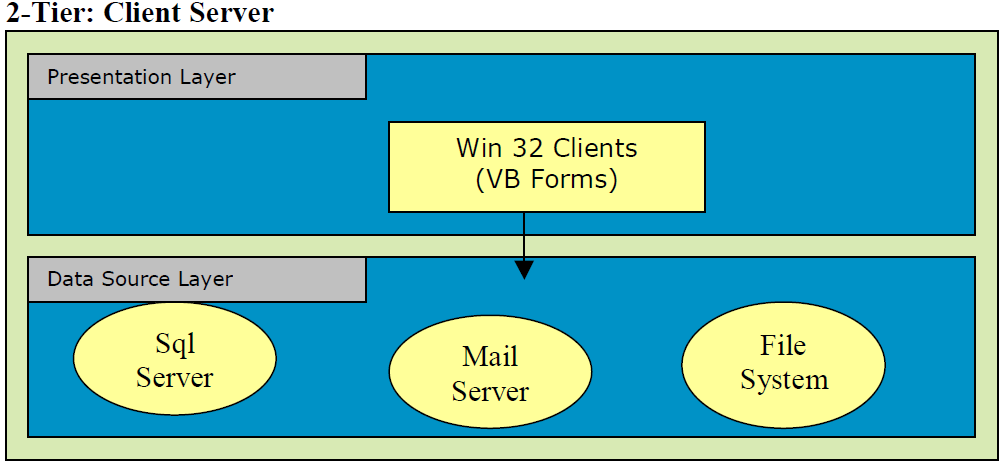
Through the appearance of Local-Area-Networks, PCs came out of their isolation, and were soon not only being connected mutually but also to servers. Client/Servercomputing was born. A two-tiered application is an application whose functionality can only be segmented into two logical tiers, presentation services and data services. The presentation services of a two-tiered application are responsible for gathering information
from the user, interacting with the data services to perform the application's business operations, and presenting the results of those operations to the user. The Presentation services are also called the presentation layer because it presents information to the user.
Things you might find in a presentation layer include a Web browser, a terminal, a custom-designed GUI, or even a character-based user interface. Client-Server architecture was a major buzzword in the early 90's, taking initially dumb terminal applications and giving them a fancy windows-like front end, using PCs with terminal emulators which presented pretty GUIs (Graphical user interface) or later Visual Basic etc front-ends. A web browser talking to a web server is an example of a client talking to a server. Here there is presentation logic (presentation tier) happening at the client, and data/file access (data access tier) and logic happening at the server. One reason why the 2-tier model is so widespread is because of the quality of the tools and middleware that have been most commonly used since the 90’s: Remote-SQL, ODBC, relatively
inexpensive and well-integrated PC-tools (like Visual Basic, Power-Builder, MS Access, 4-GL-Tools by the DBMS manufactures). In comparison the server side uses relatively expensive tools. In addition the PC-based tools show good Rapid-Application- Development (RAD) qualities i.e. simpler applications can be produced in a comparatively short time. The 2-tier model is the logical consequence of the RAD-tools’
popularity.
3 – Tier: Client Server
 Fig:: 3 – Tier or N- Tier Client Server Model
In a three-tiered application, the presentation services are responsible for gathering information from the user, sending the user information to the business services for processing, receiving the results of the business services processing, and presenting those results to the user. The most popular architecture on the web currently, mostly taking the form of web browser processing client side presentation in the form of HTML/DHTML, etc, the web server using some scripting language (ASP) and the database server (SQL
Server for example) serving up the data.
from the user, interacting with the data services to perform the application's business operations, and presenting the results of those operations to the user. The Presentation services are also called the presentation layer because it presents information to the user.
Things you might find in a presentation layer include a Web browser, a terminal, a custom-designed GUI, or even a character-based user interface. Client-Server architecture was a major buzzword in the early 90's, taking initially dumb terminal applications and giving them a fancy windows-like front end, using PCs with terminal emulators which presented pretty GUIs (Graphical user interface) or later Visual Basic etc front-ends. A web browser talking to a web server is an example of a client talking to a server. Here there is presentation logic (presentation tier) happening at the client, and data/file access (data access tier) and logic happening at the server. One reason why the 2-tier model is so widespread is because of the quality of the tools and middleware that have been most commonly used since the 90’s: Remote-SQL, ODBC, relatively
inexpensive and well-integrated PC-tools (like Visual Basic, Power-Builder, MS Access, 4-GL-Tools by the DBMS manufactures). In comparison the server side uses relatively expensive tools. In addition the PC-based tools show good Rapid-Application- Development (RAD) qualities i.e. simpler applications can be produced in a comparatively short time. The 2-tier model is the logical consequence of the RAD-tools’
popularity.
3 – Tier: Client Server

In a three-tiered application, the presentation services are responsible for gathering information from the user, sending the user information to the business services for processing, receiving the results of the business services processing, and presenting those results to the user. The most popular architecture on the web currently, mostly taking the form of web browser processing client side presentation in the form of HTML/DHTML, etc, the web server using some scripting language (ASP) and the database server (SQL
Server for example) serving up the data.
The basic functionalities of 3 – Tier or N-Tier follows are
The presentation services tier is responsible for:
• Gathering information from the user
• Sending the user information to the business services for processing
• Receiving the results of the business services processing
• Presenting those results to the user
The business services tier is responsible for:
• Receiving input from the presentation tier.
• Interacting with the data services to perform the business operations.
• Sending the processed results to the presentation tier.
The data services tier is responsible for the:
• Storage of data.
• Retrieval of data.
• Maintenance of data.
• Integrity of data.
In Windows DNA applications commonly implement their business logic using one or more of three implementation options.
• Asp Pages
• COM components
• Stored procedures running in the DBMS
Writing much business logic in ASP pages is a bad idea. Since simple languages are used, such as Microsoft Visual Basic Script, and the code is interpreted each time it is executed, which hurts the performance. Code in ASP pages is also hard to maintain, largely because business logic is commonly intermixed with presentation code that creates the user interface.
One recommended approach for writing middle-tier business logic is to implement that logic as COM objects. This approach is a bit more complex than writing a pure ASP application. Wrapping business logic in COM objects also cleanly separates this code from the presentation code contained in ASP pages, making the application easier to maintain.
The Third option for writing business logic is to create some of that code as stored procedures running in the database management system (DBMS). Although a primary reason for using stored procedures is to isolate the details of database schema from business logic to simplify code management and security, having code in such a close proximity to data can also help optimize performance.
Subscribe to:
Posts (Atom)